NextRoam › Boarding pass scanner
Boarding pass scanner
From a paper boarding pass to your iPhone.
Point the camera at the barcode on a printed pass. NextRoam reads it on your iPhone, adds your seat to the flight, and keeps it as a pass you can open in a tap.
Download on the App Store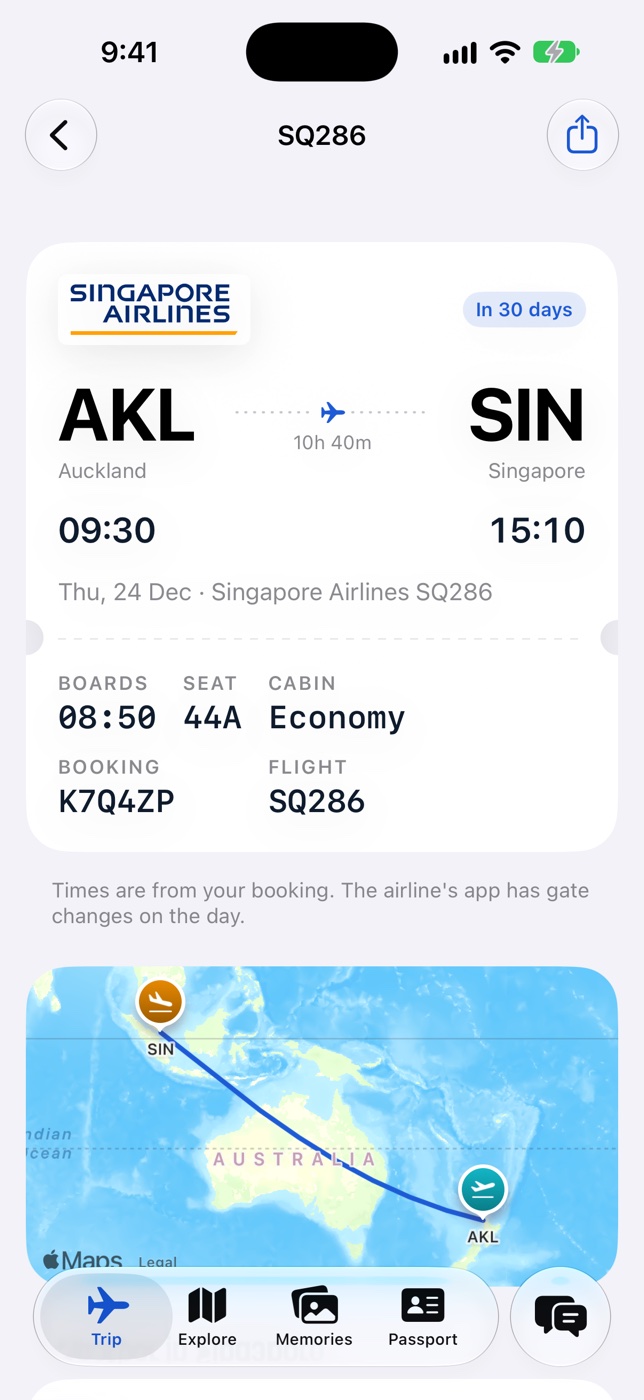
What you get
- The route in big letters, departure and arrival times in local time, and the flight number.
- Boarding time, seat, cabin and booking reference on one pass.
- A map of the flight and the weather at the other end.
Read on your iPhone
- The barcode is read on your iPhone. Nothing is uploaded.
- Scanned flights join the same trip as the bookings you forward, so your seat appears next to the rest of the journey.
Questions
Which boarding passes work?
Printed passes with the standard airline barcode (BCBP), which most airlines use.
Does it replace the airline's pass?
Keep the pass the airline gave you for the gate. NextRoam keeps the details together with the rest of your trip.
Does it show gate changes?
Times come from your booking. On the day, the airline's own app has gate changes.
Your next trip, all in one place.
NextRoam: Travel Concierge is free on iPhone, with a companion app for Apple Watch. Download it on the App Store.
Download on the App Store