NextRoam › Itinerary from email
Trip itinerary app for iPhone
Forward your booking emails. Get one itinerary.
NextRoam builds your whole trip from the confirmation emails you already have. Every flight, layover, drive and stay lines up in order, each in that city's own time.
Download on the App Store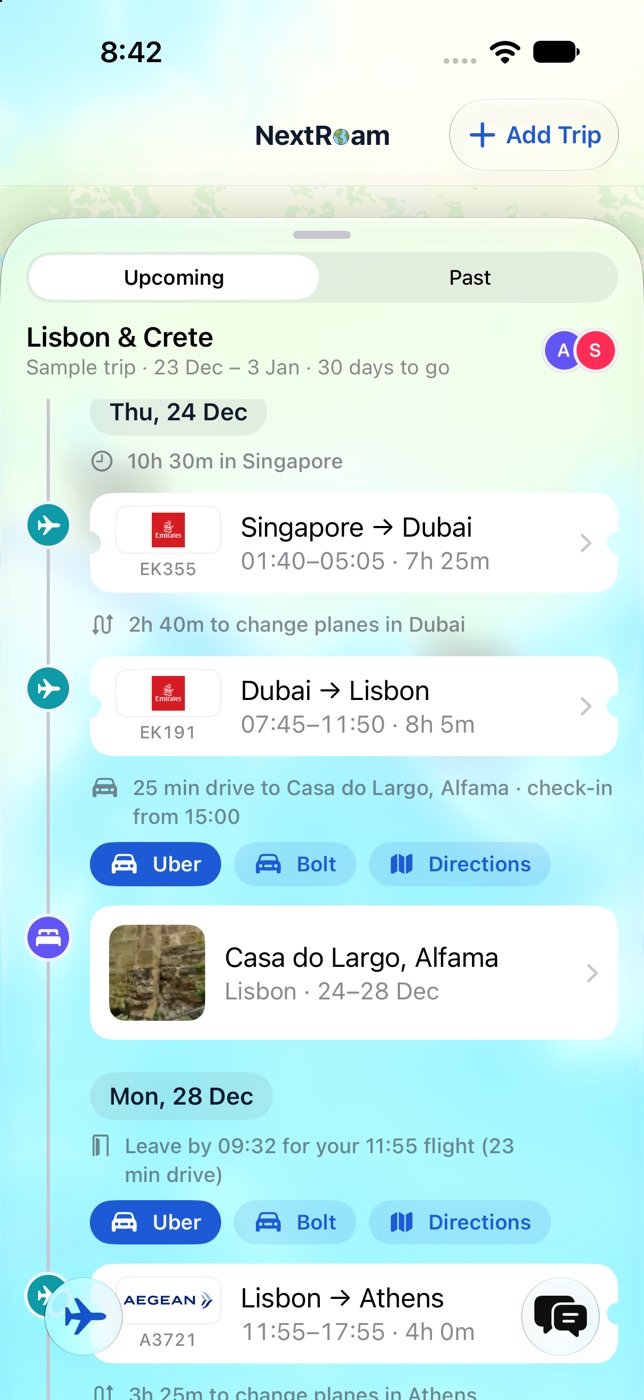
How it works
- Forward. NextRoam gives you a private address. Forward flight, hotel, car and train confirmations to it from any inbox.
- Allow. Avi, NextRoam's assistant, reads a forwarded email only after you allow it. You can switch reading off any time.
- Check. Airlines, times and booking references line up on the trip, ready to check. Bookings you forward later join on their own.
Times that make sense
- Every time is shown in the local time of the place it happens, so an overnight flight through Singapore and Dubai reads the way you'll live it.
- Layovers show how long you have on the ground, and the clock change when you land.
- Nights with nowhere to sleep are flagged, with Booking.com or Apple Maps opened near the airport with your dates filled in.
Yours, even offline
- Your trip is kept on your iPhone, so the itinerary, stays and booking references are there without signal.
- No ads, no tracking, and NextRoam never sells your data.
Questions
Which bookings can I forward?
Flight, hotel, car hire and train confirmations. Forward the confirmation itself rather than a marketing email.
Does NextRoam read my whole inbox?
No. It sees only the emails you forward to your private NextRoam address, and only after you allow it.
Can the people I travel with add bookings?
Yes. When anyone on a shared trip forwards a booking, it joins the trip for everybody.
Your next trip, all in one place.
NextRoam: Travel Concierge is free on iPhone, with a companion app for Apple Watch. Download it on the App Store.
Download on the App Store